

In the early days of AI-assisted development, we treated tools like GitHub Copilot and other AI coding assistants as “autocomplete on steroids.” We’d describe a problem, get a code snippet, copy-paste it, and… hope it works. But as any developer who has worked with AI in complex codebases knows, “hope” isn’t a development strategy. When AI agents lack awareness of your architectural patterns, their code suggestions often conflict with your existing codebase, leading to a trust deficit and slower adoption.
We are now entering the Agentic Shift—where AI agents can autonomously read your files, run terminal commands, and execute test suites. But to make these AI development tools truly effective, we need to stop treating code structure as a constraint and start seeing it as communication.Here’s how combining Test-Driven Development (TDD) and Domain-Driven Design (DDD) transforms AI from an unpredictable chatbot into a reliable coding collaborator.
The Problem: Escaping the “Chatbot Phase” Loop
Traditional AI coding workflows are stuck in a frustrating cycle of “Describe → Get Snippet → Paste → Debug → Repeat.” This “Old World” approach to AI-assisted programming has three major pain points:
- 1. Context is lost between conversations – AI agents don’t remember your previous interactions or codebase specifics
- 2. No memory of architectural patterns – The AI can’t learn your team’s coding conventions
Repeated mistakes – Without guardrails, AI agents make the same errors repeatedly

The Solution: TDD + DDD as Your AI Agent’s North Star
To move beyond the chaos of unstructured AI coding, we need a development framework that AI agents can consistently follow.
Test-Driven Development (TDD) provides the feedback loop. It tells the AI if the generated code works.
Domain-Driven Design (DDD) provides the vocabulary and boundaries. It tells the AI where the code belongs in your architecture.
When you combine these methodologies, AI agents don’t have to guess. If there’s only one “right” place for a piece of business logic, the AI can’t put it in the wrong place.
1. Structure as Communication: The DDD Layer for AI Agents
In a standard MVC or “big bucket” architecture, AI coding assistants get lost. By implementing a Domain-Driven Design structure, we create a navigable map that AI agents can actually read and understand.
The Domain-Driven Architecture Tree:
- • Actions: Small, single-purpose classes for business logic execution
- • DTOs (Data Transfer Objects): Ensuring type safety and data integrity between layers
- • Events: Preventing tight coupling between different domains
Policies: Centralizing authorization and business rules logic
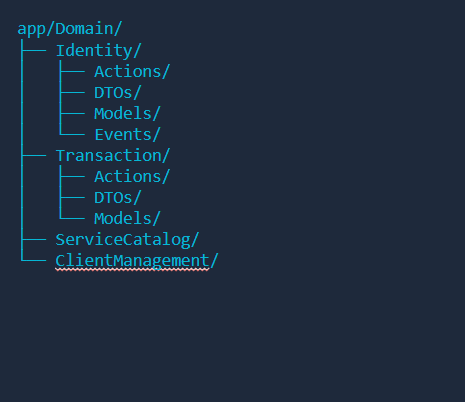
By using DTOs, we eliminate guessing games. The AI agent knows exactly what data structure is coming in and what’s going out. By using Actions, we give the AI a clear, predictable entry point for any business requirement.
2. The Feedback Loop: The TDD Layer for AI Validation
We’ve all heard that Test-Driven Development creates “living documentation,” but in reality, many development teams write tests after the code is complete, making them a mere checkbox exercise.
In an Agentic AI Workflow: Tests ARE Specifications
When you ask an AI agent to build a feature, the first step should be writing (or having it write) the test specification. When the AI runs the test and sees the “Red” (failure state), it has a clear, programmatic mandate to reach “Green” (success state).
The AI doesn’t need you to manually explain that the code is broken—the compiler and test runner provide that feedback automatically.
Key Benefits of TDD with AI Agents:
- • Immediate validation of AI-generated code
- • Clear success criteria without ambiguity
- • Reduced need for manual code review of basic functionality
- • Built-in regression prevention
3. AI Context Management: The Power of <AGENT>.md
One of the most powerful tools in this AI-assisted development workflow is the <AGENT>.md file (or similar project-specific instruction documents). This file acts as the AI agent’s long-term memory and should contain:
- • Core Coding Conventions: (e.g., “We use TAA—Thin Controllers, Actions, Always DTOs”)
- • Architecture Decision Records (ADRs): Why you chose specific patterns over alternatives
- • Common Pitfalls: Lessons learned from previous errors to prevent the AI from repeating them
- • Project-Specific Rules: Your team’s unique coding standards and preferences
This documentation gives AI coding assistants instant architectural context without needing to search your entire codebase for implicit patterns.
The Result: From Hope to Confident AI Delegation
When we transition from the “Old World” of ad-hoc AI assistance to this structured TDD + DDD approach, the developer experience shifts dramatically:
Before Structured AI Collaboration:
- ❌ “I hope the AI understood my requirements.”
- ❌ Constant code reviews catching basic architectural violations
- ❌ AI-generated code that conflicts with existing patterns
- ❌ Time wasted debugging AI suggestions
After Implementing TDD + DDD with AI:
- ✅ “The AI follows our patterns because there’s only one correct way.”
- ✅ Tests catch deviations immediately; code review focuses on business logic, not syntax
- ✅ AI suggestions align with your architecture by default
- ✅ Faster feature development with reliable AI assistance
How to Get Started with TDD + DDD for AI Agents
You don’t have to refactor your entire monolith overnight. Here’s a practical roadmap:
Step 1: Start with ONE Domain
Pick a complex feature or module and extract it into this structured approach. Use it as a pilot project.
Step 2: Write Your <AGENT>.md (or AI Instructions File)
Document your specific architectural “laws” and coding conventions. Make implicit knowledge explicit.
Step 3: Add Tests for Existing Code
Give AI agents concrete patterns to follow by creating test coverage for your current codebase.
Step 4: Introduce Actions/DTOs Gradually
Apply the new DDD pattern to new features first, then gradually refactor existing code.
Step 5: Iterate and Refine
Update your AI instruction files as you discover new patterns and edge cases.
Conclusion: Structure is the Language of AI Collaboration
Code structure isn’t about limiting your creativity as a developer—it’s about building a language that your AI collaborator can finally understand.
The fundamental principle is simple: The AI can’t put code in the wrong place if you’ve defined exactly where the right place is.
By combining Test-Driven Development and Domain-Driven Design, you create a predictable, scalable framework for AI-assisted development. Your AI coding assistant becomes a trusted team member that follows your architectural patterns, validates its own work through tests, and delivers consistent, high-quality code.
The future of software development isn’t human OR AI—it’s human AND AI, working together within well-defined structures that benefit both.